
A Work Item is a new piece of work in a project. Serpent sets up the underlying Git branch for you, so you can focus on the Salesforce changes rather than the mechanics. New to these terms? Start with How Serpent Works: Key Concepts.
Before you start: the project's source control must already be connected, because that is where the Work Item's branch is created. You set this up when you create the project, or later under Project Settings > Source Control.
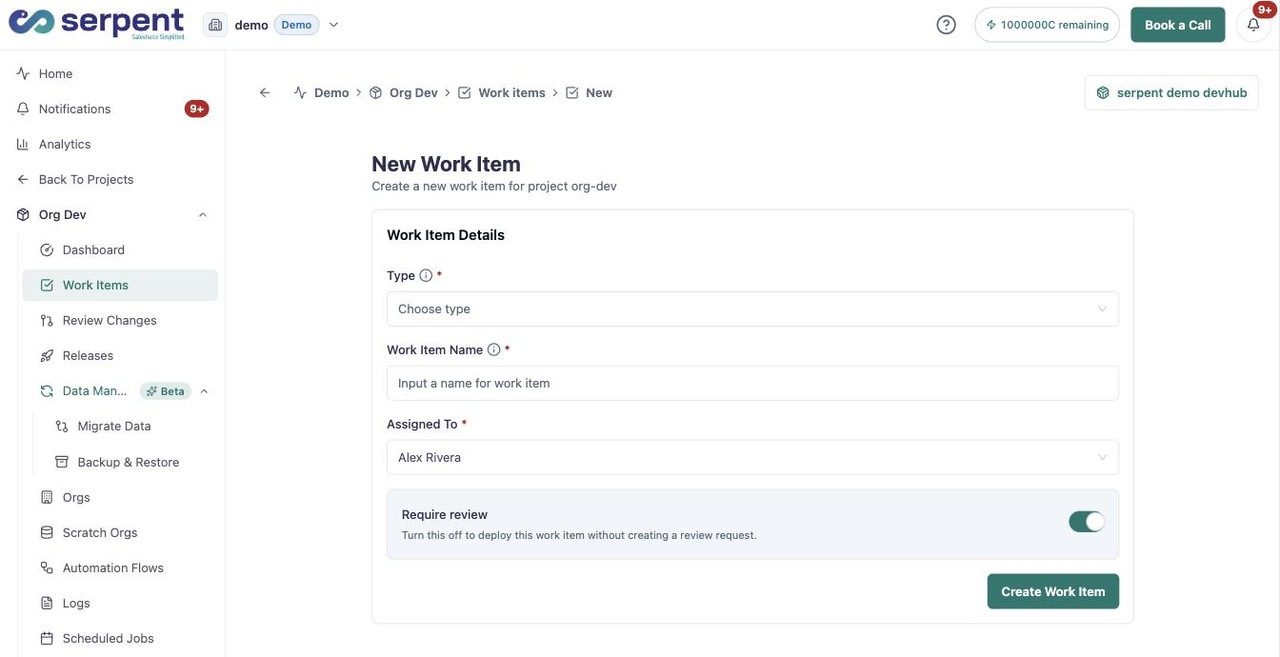
Create it in Serpent
Open the New Work Item form with the "Try it in Serpent" button above, then:
-
Pick the type
Click Type and choose Task or Bug, depending on the work.
-
Name the Work Item
Enter a Work Item Name that describes the change, so the branch is easy to recognise later.
-
Assign an owner
Choose who the Work Item is Assigned To.
-
Create it
Click Create Work Item. Serpent sets up the Git branch and opens the new Work Item, ready for your changes.
What to expect
Serpent creates the branch the moment you click Create Work Item, then opens the Work Item on its Build stage. If no branch is created, source control is not connected for the project: connect it under Project Settings > Source Control, then create the Work Item again. See No branch was created for my Work Item if it still does not appear.
Then add your changes
- Pull in the Salesforce metadata you are changing.
- Keep iterating until the change is ready for review.
- Hand the Work Item off for review when it is complete.