
Data migration, masking and sandbox seeding
Salesforce Data Deployment
 Start free
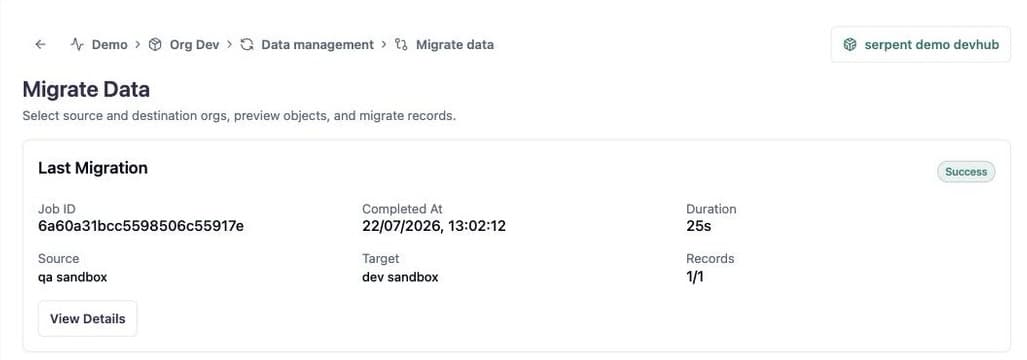
Salesforce data migration and masking, built into your release flow

Migrate Salesforce data between orgs
Choose a source and destination org, switch on PII masking if you need it, and run the migration from the Data Management tab. Metadata and data move in the same release flow.
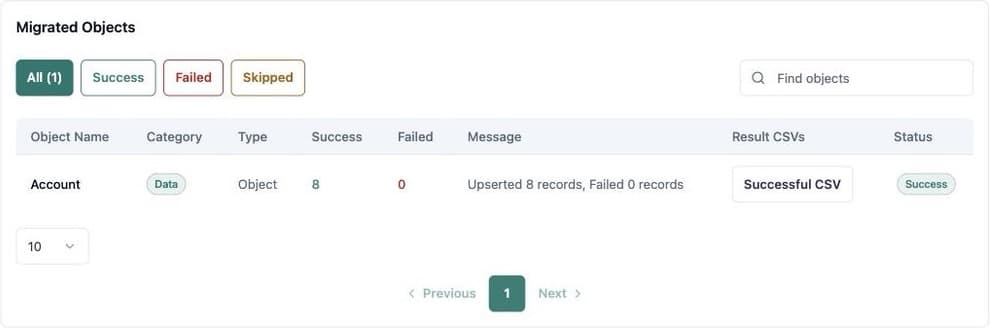
Review every migration run
The Migration Details page shows the execution timeline, and the Migrated Objects table filters by success and failed status.
Sandbox seeding and data backup without scripts
Keep every environment populated and recoverable from one platform.
PII masking
Obfuscate common personal fields during preview and migration, keeping production-shaped data usable in lower environments.
Sandbox seeding
Serpent seeds as part of environment setup and release pipelines, so refreshed sandboxes and scratch orgs come back populated.
Dependency checks
Built-in dependency checks reduce migration surprises, so runs finish cleanly more often.
Backup and restore
Capture a known-good state and recover supported org metadata and records, with a Restore History for the project.
Data and metadata, one pipeline
Migrate Data is an action in the visual automation flow builder, so data moves when your release does.
Migrate Data in automation flows
Read the automation flow guideAdd Migrate Data beside Deploy, Create Release and Execute Apex on the visual canvas, with no code.
Data migration and masking guide
Read the migration guideChoose the orgs, mask sensitive values and run the migration, with screenshots.
Scheduled backups
Read the scheduled jobs guideSchedule recurring backups, or a one-time deployment, from the Scheduled Jobs screen.
Backup and restore guide
Read the backup guideBackups complement rollback: rollback reverses a release, and backups protect against broader data loss.
Salesforce data migration, answered
How Serpent handles data deployment, masking and sandbox seeding.
Backed by Salesforce partners.
Salesforce MVPs, Trainers, ISV partners, community leaders, and consultancies who deliver on Salesforce alongside Serpent every day.