
Serpent Team

Tekunda Team
Source: Salesforce Ben
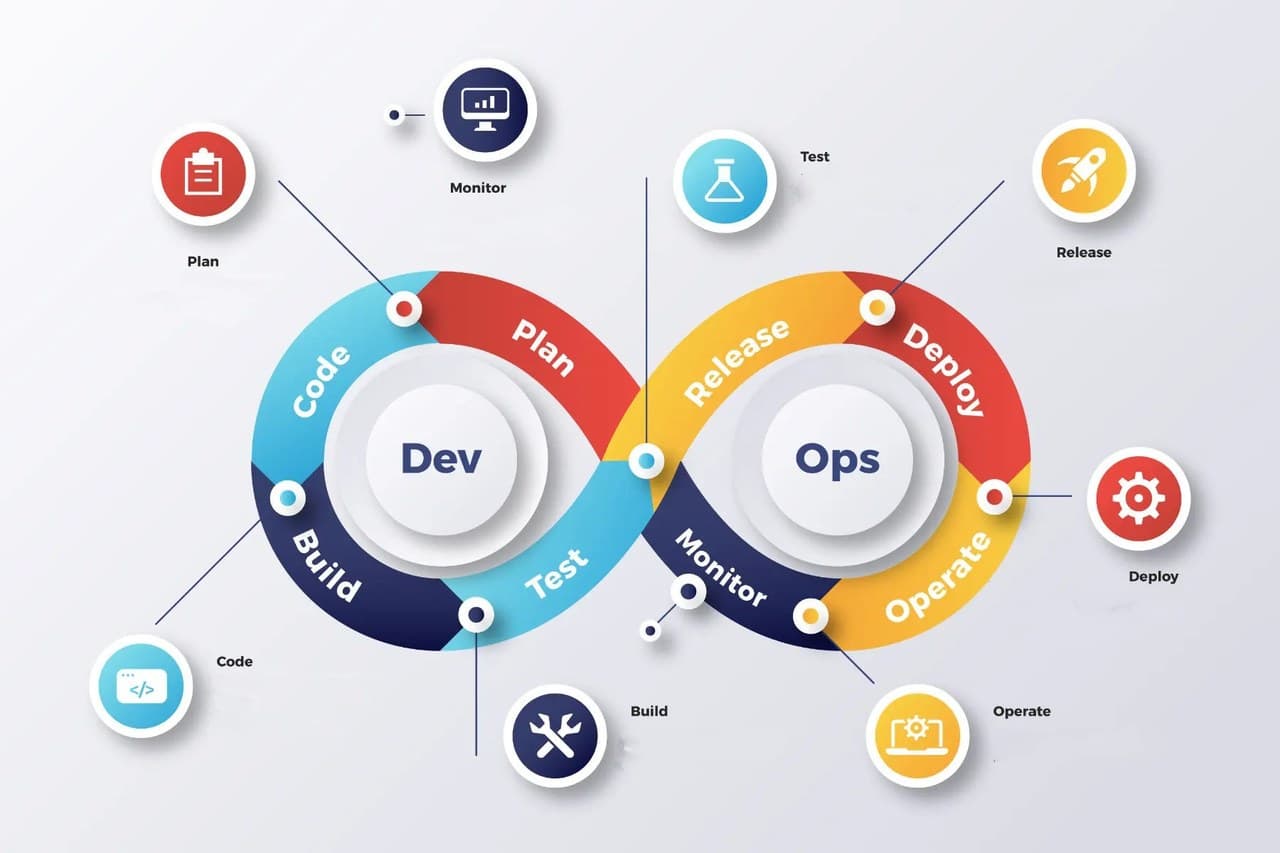
DevOps enables organisations to develop and enhance their products more rapidly compared to other software development methodologies. Continuous Integration (CI) is a key practice in DevOps software development. It includes the building and unit testing phases of releasing software. Each committed revision initiates an automatic build and test, allowing for early identification and resolution of issues before releasing updates to customers.
Salesforce DevOps is the same as actual DevOps while focusing on Salesforce at scale. This approach helps development teams detect problems, identify bugs, and fix them before releasing changes to their customers. DevOps = automated, more regular releases.
Salesforce has several tools for deploying applications. These include change sets, Workbench, SalesforceDX, DevOps Center, and Force.com migration tool, CI/CD Pipeline, and 3rd part AppExchange tools. Learn about Salesforce Development and Deployment Process.
Here are some benefits of DevOps tools.
DevOps is a journey that starts with small steps. Make sure the whole team is on onboard and up to speed. Layer on complexity when your team and process is ready. There are pillars of a successful DevOps process.
Version control is the new single source of truth. Version Control Systems (VCS) help you track changes. They also create strong security for your important code and data.
CI/CD is not just for deploying changes. It's more than that; it allows you to validate the build, run automation testing, and help you in code backup. CI/CD ensures reliable and smoother deployments and a lower code coverage failure rate.
A good DevOps tool runs automation tests on every pull request and before each release. This helps ensure you never merge or release changes that are buggy or not tested.
Protect yourself from malicious attacks, Salesforce bugs, accidental deletions, etc. Having the peace of mind that you can always roll back.
Code scanning tools help automate parts of the manual process of code review in Salesforce. You can use Static Code Analyser tools to achieve the same results.
Learn more about DevOps' 5 pillars.

Let’s understand the difference term of CI/CD
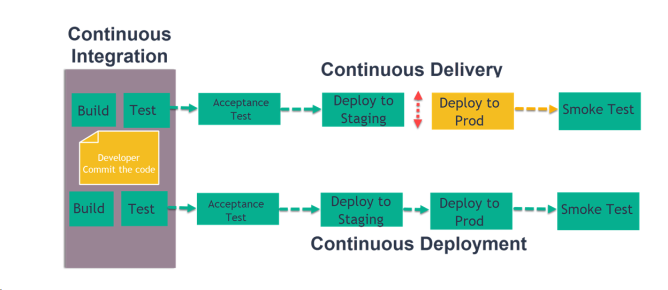
Using continuous integration, a product includes and combines every code change with each commit from all developers. An automated build then verifies each check-in, letting teams detect issues early.
Continuous delivery makes sure that code is quickly and safely deployed to production. This is done by manually pushing each change to a similar environment. When a new release candidate is created all modifications are automatically delivered to a staging environment. After extensive testing and when the time is right, you can deploy the application to production with a push of a button.
Continuous deployment is the next step of continuous delivery. Using continuous deployment, each modification that passes the automated tests is deployed to production automatically. Most firms that aren’t bound by regulatory or other constraints should have a goal of continuous deployment
There are different DevOps Tools are available. Which can be divided into the below category.
You can build your own tool using different CI/CD platforms. Like below:
Those DevOps tools are well integrated with Salesforce.
Releasing a managed package is a high-stakes, multi-step process. Even small changes require careful metadata handling, scratch org validation, Git coordination, and version promotion. You’re dealing with:
Most DevOps tools assume deep CLI knowledge, force you into YAML scripts, or break down when metadata gets tricky - leaving developers firefighting and non-technical team members completely out of the loop.
To release a new version of your managed package via CLI:
git checkout feature/new-featuresfdx force:org:create -s -f config/project-scratch-def.json -a feature-orgsfdx force:source:push -u feature-orgsfdx force:apex:test:run -u feature-org --wait 10sfdx force:package:version:create -p MyPackage -d force-app -k test1234 -v PackagingOrgsfdx force:package:version:promote -p 04tXXXXsfdx force:package:install -p 04tXXXX -u Sandbox --wait 10sfdx force:package:install -p 04tXXXX -u Production --wait 10What used to take 8-10 manual steps - and only worked if everything aligned - is now reduced to a simple 3-click flow:
All while offering safety, visibility, and full team alignment.
| Tool | Task-Oriented Workflow | Automation Pipelines | Backup & Rollback | VS Code Extension | Pricing | Ideal For |
|---|---|---|---|---|---|---|
| DevOps Center | ❌ | ❌ | ❌ | ❌ | Free | Teams starting with DevOps practices |
| Serpent | ✅ | ✅ | ✅ | ✅ |
Free-$699/team /month |
Teams of all sizes seeking simplicity and speed |
| Gearset | ❌ | Partial | ✅ | ❌ | $200/user /month |
Mid-sized to Enterprise teams |
| Copado | ❌ | Partial | ✅ | ❌ | $250/user /month |
Enterprises requiring compliance |
| Flosum | ❌ | Partial | ✅ | ❌ | $300/user /month |
Teams preferring native Salesforce |
Based on your company's needs and budget, and considering all the above tools, you can decide if you need to build a DevOps process or buy one.
So far we understand what DevOps is and which all are important parts of successful DevOps. Let's see some DevOps best practices.
1. Environment Planning:
2. Environment Management:
3. Version Control:
4. Environment Configuration:
5. Automated Deployment:
6. Data Management:
7. Monitoring and Logging:
8. Compliance and Security:
For a current, side-by-side view of the platforms, read our 2026 guide to Salesforce DevOps tools, which compares ten options on pricing and fit.
What is Salesforce DevOps?
Salesforce DevOps is the
same as actual DevOps, and it focuses on leveraging Salesforce at scale.
This helps development teams detect problems, identify bugs, and fix them
before releasing changes to their customers
Is Salesforce DevOps a good career?
Yes, DevOps engineers have good career option. As now days every project
is using Salesforce DevOps.
What does a Salesforce DevOps engineer do?
DevOps Engineer are responsible for implementing continuous delivery,
optimisation, monitoring, release management. They also support the end to
end release process.
Salesforce DevOps is a culture and a set of process that bring development and operations teams together to complete software development. I hope after looking into all DevOps Tools you can decide your deployment strategy and process.
Commitment free!