
Serpent connects to your Salesforce orgs with an authorization that can expire or be revoked. When that happens, re-authenticating restores access so the org can be used again.
Restore access in Serpent
Open the Orgs list with the "Try it in Serpent" button above, then:
-
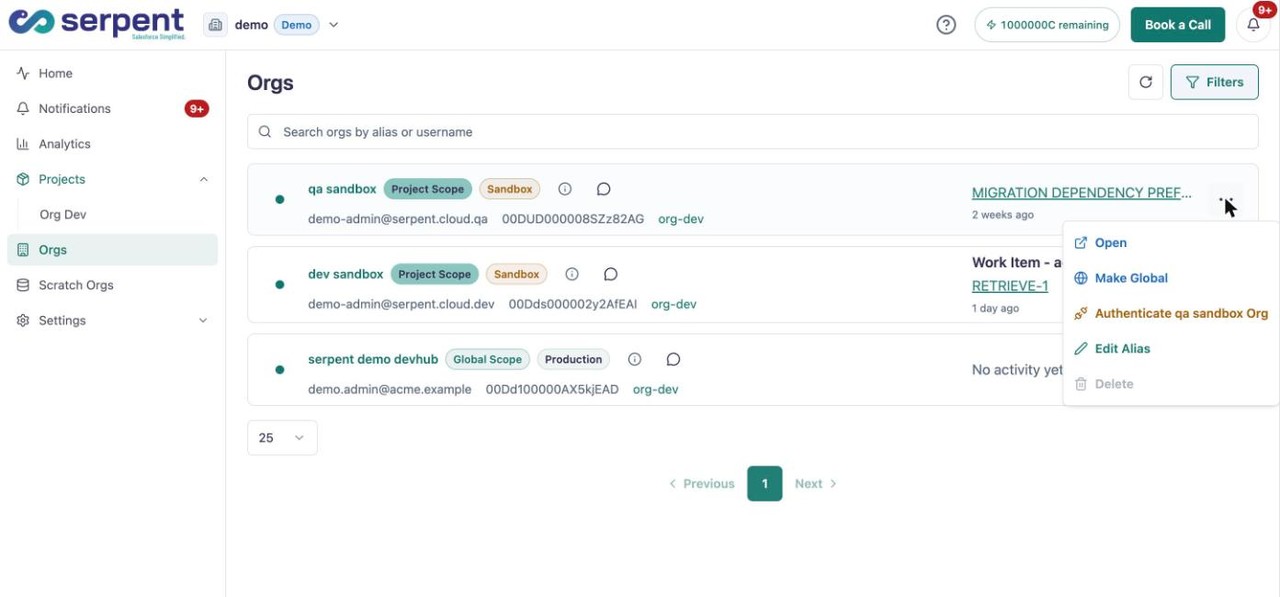
Open the org's actions
Find the org that lost access and open its actions menu.
-
Choose Authenticate
Click Authenticate to start re-establishing the connection.
-
Sign in again
Sign in to the org to refresh its authorization. Retrieves, deployments, and other actions then work as before.
When you need to re-authenticate
- An org connection has expired.
- Access was revoked in Salesforce.
- Actions against the org start failing because Serpent can no longer reach it.