
Auto release creation lets Serpent open a release automatically when changes merge, rather than waiting for someone to assemble one by hand. It is continuous delivery for Salesforce: changes flow toward the next environment as they are approved.
Set it up in Serpent
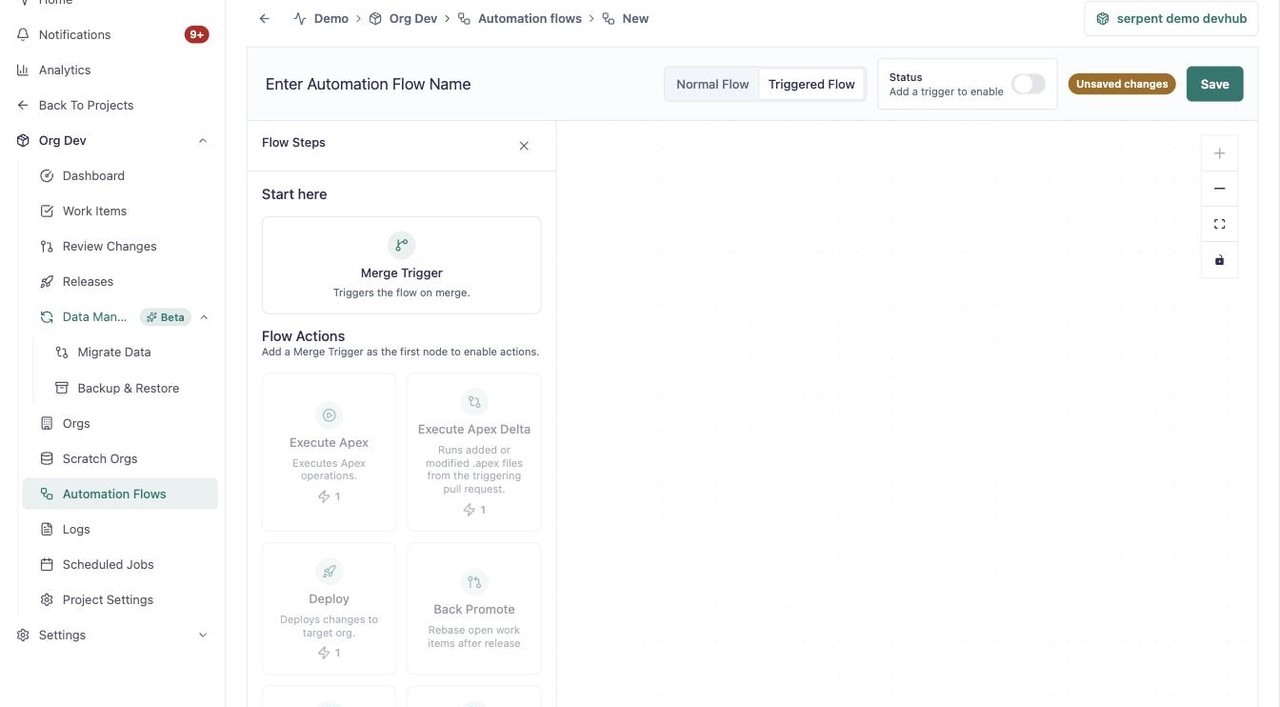
Auto release creation is a triggered automation flow. Open Automation Flows with the "Try it in Serpent" button above, then:
-
Start a new flow
Click New Automation Flow, then switch it to Triggered Flow.
-
Add the Merge Trigger
Add the Merge Trigger start node so the flow runs when reviewed work merges.
-
Add Create Release
From the Flow Actions palette, add Create Release, alongside Deploy and Back Promote as needed.
Triggered by a merge
When reviewed work merges, Serpent can gather those changes into a release automatically, building the deployment plan from what moved. This keeps delivery moving without a manual trigger between review and release.
Still validated
Automatically created releases run the same preflight validation as any other release, so speed does not come at the cost of the checks that keep a deployment safe.