
Tekunda Team

Tekunda Team

Salesforce is a powerful platform for managing customer relationships, but businesses often need to integrate it with other applications to streamline workflows, improve data consistency, and enhance overall functionality. However, integrating Salesforce with third-party applications comes with its own set of challenges. This blog post explores these challenges and provides solutions to ensure smooth integration processes.
Would you like some help streamlining your Salesforce integrations?
Contact us now to secure your spot with Tekunda's innovative team to simplify your integration challenges.
Challenge: Ensuring that data remains consistent and synchronized across Salesforce and third-party applications can be difficult. Inconsistent data can lead to errors, redundant records, and data integrity issues.
Solution: Implement robust data synchronization strategies, such as real-time sync or scheduled batch updates, using tools like MuleSoft, Informatica, or custom-built middleware. Additionally, utilize Salesforce’s native tools like Data Loader and Apex to handle data migrations and synchronization efficiently.
Challenge: Salesforce has API call limits that can restrict the number of interactions between Salesforce and third-party applications. Exceeding these limits can result in performance bottlenecks and potential downtime.
Solution: Optimize API usage by combining multiple API calls into a single call where possible and using bulk API operations for large data sets. Employ Salesforce’s event-driven architecture with Platform Events to reduce the dependency on API calls and improve performance.
Challenge: Integrating third-party applications with Salesforce requires sharing sensitive data, raising concerns about data security and compliance with regulations like GDPR and CCPA.
Solution: Ensure all data transfers are encrypted using protocols such as TLS. Implement OAuth for secure authentication and authorization. Regularly audit your integrations for compliance with security standards and regulatory requirements. Use Salesforce Shield for advanced security features like encryption, event monitoring, and field audit trail.
Challenge: The architecture of integrating Salesforce with multiple third-party applications can become complex, especially when dealing with different data models, APIs, and protocols.
Solution: Simplify the integration architecture by using integration platforms such as MuleSoft or Dell Boomi, which provide pre-built connectors and a unified platform to manage integrations. Document your integration architecture thoroughly and use modular designs to make the system more manageable and scalable.
Challenge: Real-time data integration can be challenging due to latency issues and the need for continuous data flow between systems.
Solution: Leverage Salesforce’s Streaming API for real-time data updates. Use middleware solutions that support real-time data processing and message queues to handle data flow efficiently. Optimize network and server configurations to reduce latency.
Would you like some help streamlining your Salesforce integrations?
Contact us now to secure your spot with Tekunda's innovative team to simplify your integration challenges.
Before starting the integration, define clear objectives, requirements, and success criteria. Conduct a thorough analysis of the third-party application’s capabilities and limitations.
Middleware solutions like MuleSoft, Informatica Cloud, and Jitterbit can simplify the integration process by providing pre-built connectors, data transformation capabilities, and centralized management of integration flows.
Implement monitoring tools to track the performance and health of your integrations. Regularly update and maintain your integrations to adapt to changes in APIs, data models, and business requirements.
Design your integration architecture to be scalable to accommodate future growth and changes in business processes. Use cloud-based integration platforms that can scale automatically based on demand.
Conduct thorough testing of your integrations, including unit tests, integration tests, and user acceptance tests, to ensure they work as expected and handle edge cases gracefully.
To provide a more comprehensive understanding of Salesforce integrations, let's delve into enabling REST APIs in Salesforce, a crucial aspect of many integration scenarios.
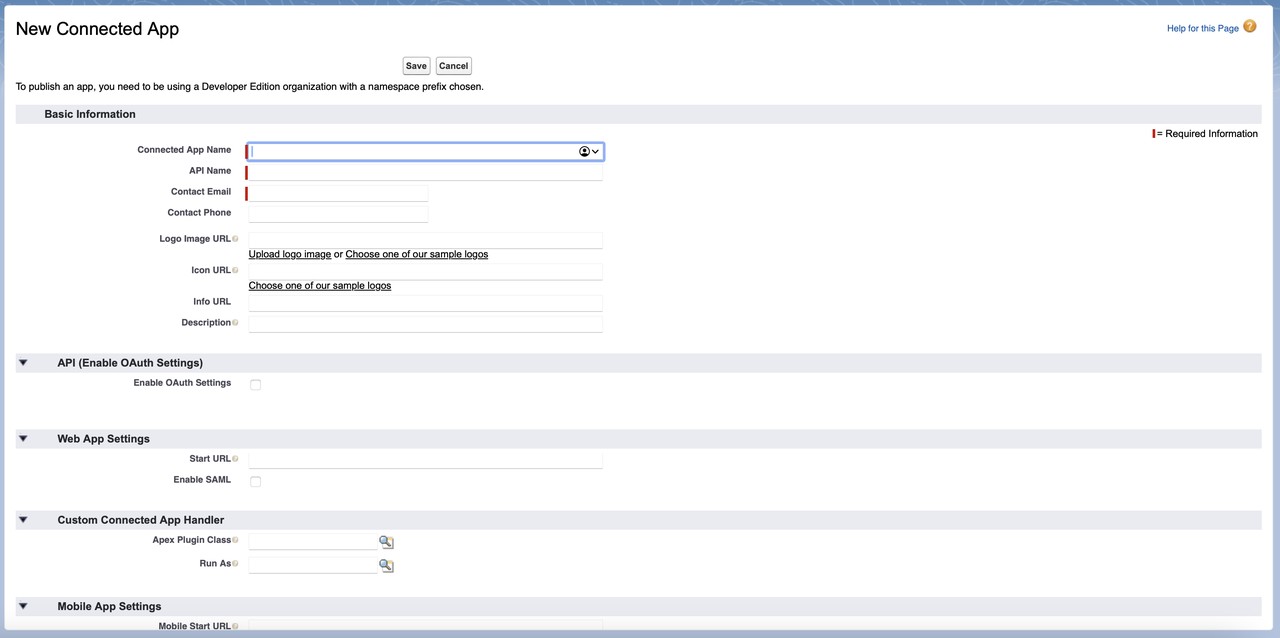
https://login.salesforce.com/services/oauth2/callback).
POST https://login.salesforce.com/services/oauth2/token
grant_type, client_id,
client_secret, username, and password.
GET /services/data/vXX.X/sobjects/Account
Authorization: Bearer YOUR_ACCESS_TOKEN
Integrating Salesforce with third-party applications is essential for maximizing the value of your CRM system and enhancing business processes. While the challenges can be significant, the solutions and best practices outlined above can help ensure a successful integration. By leveraging tools like Tekunda Serpent, you can simplify these processes, reduce manual effort, and maintain a seamless flow of data across your systems.
How do you avoid hitting Salesforce API limits?
Combine multiple calls into one where you can, and use bulk API operations for large data sets. Platform Events let other systems react to changes instead of polling, which removes a lot of routine API traffic.
How do you keep Salesforce and a third-party system in sync?
Pick real-time sync or scheduled batch updates depending on how fresh the data has to be, and run it through middleware such as MuleSoft, Informatica or Jitterbit. Salesforce native tools like Data Loader and Apex handle the migration side.
How do you enable the REST API in Salesforce?
Confirm API Enabled under API Settings in Setup, then create a Connected App with OAuth settings and a callback URL. Once you have an access token, call the REST endpoints with it in the Authorization header.
How do you secure data moving in and out of Salesforce?
Encrypt every transfer with TLS and use OAuth for authentication and authorisation rather than shared credentials. Audit your integrations regularly, and use Salesforce Shield where you need encryption, event monitoring and field audit trail.
Ready to streamline your Salesforce integrations?
Contact us now to secure your spot with Tekunda's innovative team to simplify your integration challenges.
Commitment free!